Capas
A looper for kids on the M-VAVE FM-1. A song is four layers over a loop of 32 steps (two bars): drums, bass, chords and melody. Record them one at a time while the loop plays, or put the notes in step by step, and change how each one sounds with the knobs. There are five songs, each with five parts (A to E), kept on the FM-1 as you go.
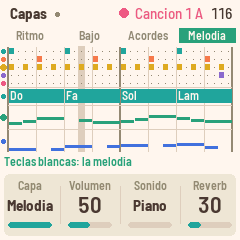
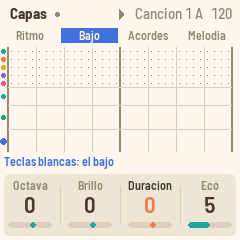
Playing
| KNOB 1 | The layer the keys play: drums, bass, chords or melody (on the FX page, as it starts). |
| Black keys | The drums (kick, snare, hi-hat, claves, cymbal), or on the chords layer the chords C, F, G, Am and Dm. |
| White keys | The bass and the melody, in C major. |
| PLAY | The loop, on and off. |
| REC | Record into the layer as the loop goes round (stopped: it waits for your first note, and the loop starts with it). Each time round that adds something is one undo. |
| EDIT | Undo; held, clears the layer. |
| OCT− · OCT+ | Edit step by step: the first press starts editing, then they move the cursor (and repeat while held); so does ALGORITHM. A key puts its note or drum at the cursor, and held while the cursor moves it makes the note longer. SEQ leaves. |
| SELECT | The song's tempo. |
| PRESETS | The song, 1 to 5. Hold SAVE while turning it to copy this song to another. |
| GLO | The song's next part (A to E): at once when stopped, from the loop's top while it plays (GLO blinks meanwhile; asked again, at once). It goes no further than the first empty part. GLO + a black key picks that part. SAVE + GLO copies this part into the first empty one; GLO + EDIT clears it (EDIT undoes). |
| ARP | The chords as an arpeggio, a note a step: up, down, up and down, off. Held with a black key, an effect while you hold it: stutter, under water, slow, echo, no drums. |
| HOME | Jambox FM-1's pages: its chord harp, rhythms and sequencer. HOME held comes back. |
The knobs
FX, SEL, ENV and LFO pick what KNOB 1–4 do; the button of the page in use is lit. Each song keeps its layers, sounds, levels, settings and tempo.
- FX: the layer. Layer, its level, its sound (drum kits, bass sounds, 64 built-in sounds), reverb.
- SEL: how the layer plays. Octave (the drums: tuning), brightness, length (shorter dies away while held, longer rings on after), echo.
- ENV: the levels. Drums, bass, chords, melody.
- LFO: the song. Tempo, swing, key (all but the drums), and En orden: the parts that hold something take turns by themselves, a time round each.
Jambox FM-1's pages
Under HOME, everything of Jambox FM-1 is there: the chord harp, its rhythms, chord sequence and setup. Its editor works with them (chord sets, rhythms of your own and DX7 sounds for the harp), over USB or with the emulator; Capas's songs aren't in it.
To go back to the official firmware, use the installer's "Back to the stock firmware", or M-VAVE's updater, M-UPGRADE, from m-vave.com/download. Omnichord is a trademark of Suzuki; M-VAVE and FM-1 are trademarks of their owners. Capas is not affiliated with any of them.
Capas is built on Jambox FM-1, which is inspired by and forked from FoMni-1. The rhythms, waves and drum sounds come from Chordian, Jan125's OM-84 emulator (CC0); the platform is Felucca's by Leo Kuroshita (Hügelton Instruments), by way of X0X.